
Download a PDF report
1
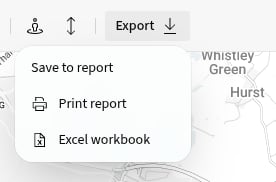
Open Print report
Select Export, then Print report.
2
Choose the output
Select an available Print layout, then review or change the File name.
3
Create the PDF
Select Print. PICSy shows the report’s progress and downloads the PDF when it is ready.
Download an Excel workbook
- Select Export.
- Select Excel workbook.
- Wait for PICSy to prepare and download the file.